Viewing Employee Leaves

This guide explains how administrators and employees can view leave information and understand leave entitlement fields.


Employee Leave List

The Employee Leave List displays all employee leave records. Administrators can use this to review leave details and approve or reject requests.

Employee Leave List

When to Use

Admin Backup

Administrators should use this feature when the supervisor of the person who applied for leave is not able to process the request.

How to Access

Go to Manage > Leave > Employee Leave List

From here you can:

  • View all employee leave requests
  • Approve or reject pending requests
  • Filter by leave period or employee

Employee Leave Entitlement

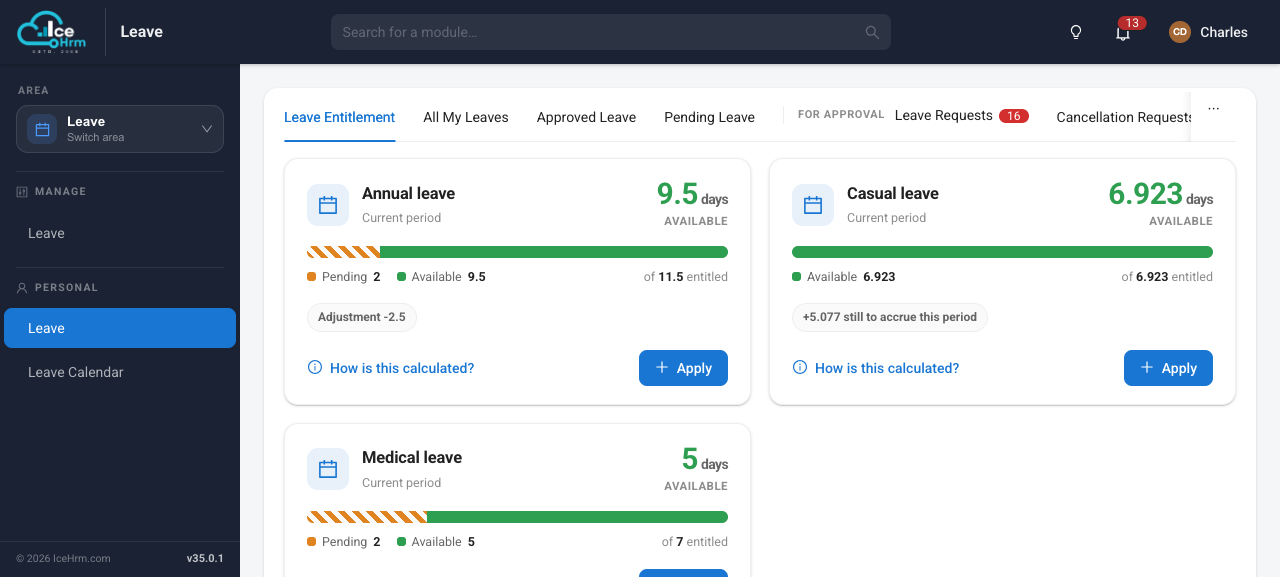
Employees can view a summary of their leave balances for the current period.

Leave Entitlement

Entitlement Fields Explained

FieldDescription
Available LeavesThe number of leave days an employee can request during the current leave period
Pending LeavesLeave days that are waiting for approval or rejection
Leaves to be AccruedAdditional leave days that will be added by the end of the leave period (if accrual is enabled)
Leaves Carried ForwardLeave days transferred from the previous leave period

Understanding Available Leaves

Available leaves represent the total number of days an employee can currently request.

Calculation

Available = Entitled + Carried Forward - Utilized - Pending

Example

Entitled Days: 20
Carried Forward: 3 days
Utilized: 8 days
Pending: 2 days

Available = 20 + 3 - 8 - 2 = 13 days

Understanding Pending Leaves

Pending leaves are leave requests that have been submitted but not yet processed.

StatusCounted as Pending
Awaiting approvalYes
Approved but not yet takenYes
Already takenNo (moves to Utilized)
RejectedNo
CancelledNo

Understanding Accrued Leaves

When leave accrual is enabled, employees earn leave days gradually throughout the leave period instead of receiving them all at once.

How Accrual Works

SettingExample
Annual Entitlement24 days
Accrual FrequencyMonthly
Monthly Accrual2 days per month

Accrual Timeline Example

MonthAccrued This MonthTotal Accrued
January2 days2 days
February2 days4 days
March2 days6 days
.........
December2 days24 days
Note

When accrual is enabled, employees can only request leave up to their currently accrued amount, not their full annual entitlement.


Understanding Carried Forward Leaves

Carried forward leaves are unused days from the previous leave period that have been transferred to the current period.

Example

Previous Period Unused: 8 days
Maximum Carry Forward Allowed: 5 days
Carry Forward Percentage: 100%

Result: 5 days carried forward (limited by maximum)
Expiry: These days may expire after a set period (e.g., 90 days)

Quick Reference

FieldWhat It Shows
AvailableDays you can request now
PendingDays awaiting approval
To be AccruedDays you'll earn by period end
Carried ForwardDays from previous period

Access Summary

User RoleHow to Access
EmployeeLeave > Leave Entitlement
SupervisorLeave > Subordinate Leaves
AdminManage > Leave > Employee Leave List