Sharing Company Documents
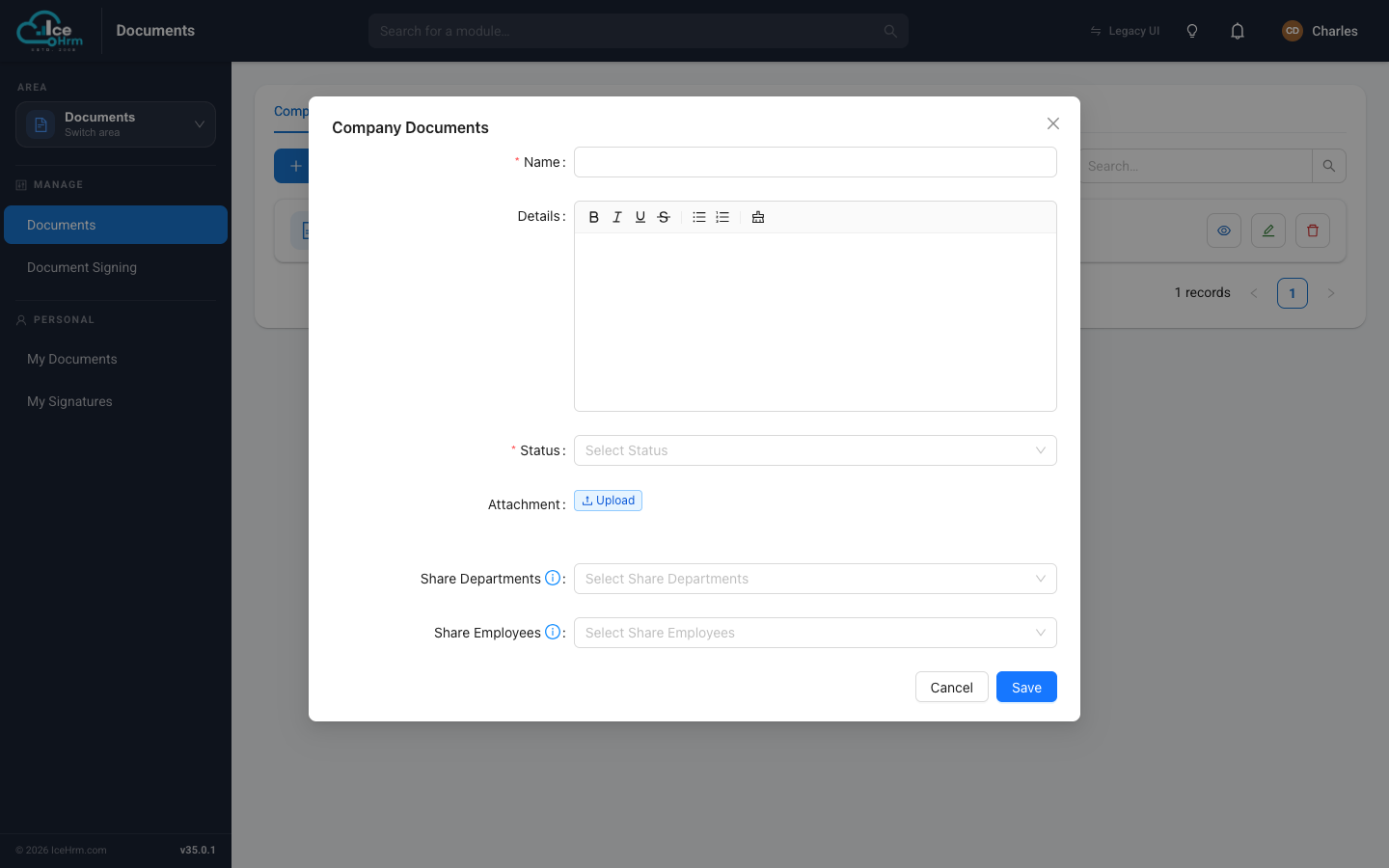
When you create or edit a company document, two fields on the form control who can see it: Share Departments and Share Employees.
| Field | Who it shares with |
|---|---|
| Share Departments | Everyone in the departments you pick |
| Share Employees | Only the specific people you pick |
Choose one, not both
You can share a document by department or by employee — not both at the same time. IceHrm only lets you save when exactly one of the two fields is filled in.
Share with departments
Use this for documents that apply to whole teams — policies, procedures, department announcements.
- Open the company document (Add New, or Edit an existing one).
- In Share Departments, select one or more departments.
- Leave Share Employees empty.
- Click Save.
Example: choosing "Marketing Department" and "Head Office" means everyone assigned to either department can see the document.
Share with specific employees
Use this for confidential or role-specific documents.
- Open the company document.
- In Share Employees, select the individuals.
- Leave Share Departments empty.
- Click Save.
Example: choosing two named people means only those two can see it, whatever their department.
Summary
| How you shared | Who can view |
|---|---|
| Share Departments | All employees in those departments |
| Share Employees | Only those individuals |
| Neither field filled | No one — the document isn't shared |
Employees see documents shared with them under Documents → My Documents → Company Documents.