How to Deploy IceHrm in Production: Complete Hosting Guide
Reading Time:
Reading Time:
Moving a Human Resource Information System (HRIS) from a local test environment to a production-ready infrastructure is a significant architectural milestone. In today's digital landscape, where data privacy regulations like GDPR and local labor laws demand absolute data integrity, your deployment strategy is just as critical as the software itself. Choosing a secure, GDPR-compliant HRIS software solution is only the first step; maintaining its environment is the second.
Deploying a robust, self-hosted human resource management system like IceHrm in a production environment requires a fundamental shift in mindset: you are moving from "making it work" to "making it resilient." This guide provides a technical deep dive into the infrastructure requirements, security hardening protocols, and configuration choices necessary to run a professional-grade, self-hosted HRIS.
Before a single line of code is moved, you must decide where the heart of your HR operations will beat. Modern production deployments typically follow one of three architectural paths:
This is the most common path for mid-market companies managing 100 to 500 employees. Utilizing scalable cloud providers like AWS, Google Cloud, or DigitalOcean allows you to dynamically scale system resources as your employee database expands.
For organizations operating in high-security sectors—such as defense, government, or specialized healthcare—keeping data on physical hardware inside a secure local server room is often a strict compliance requirement.
If your HR team needs the absolute privacy of a self-hosted system but your internal IT team is overstretched, our enterprise managed HR cloud hosting services serve as the ideal middle ground. The infrastructure remains completely dedicated to your organization, while the underlying server maintenance is handled entirely by our experts.
IceHrm is built on a highly efficient PHP and MySQL stack. However, production workloads—especially when generating complex payroll reports or handling real-time biometric attendance synchronizations—require dedicated system overhead to prevent performance bottlenecks.
Recommended Specs for 100 to 500 Employees:
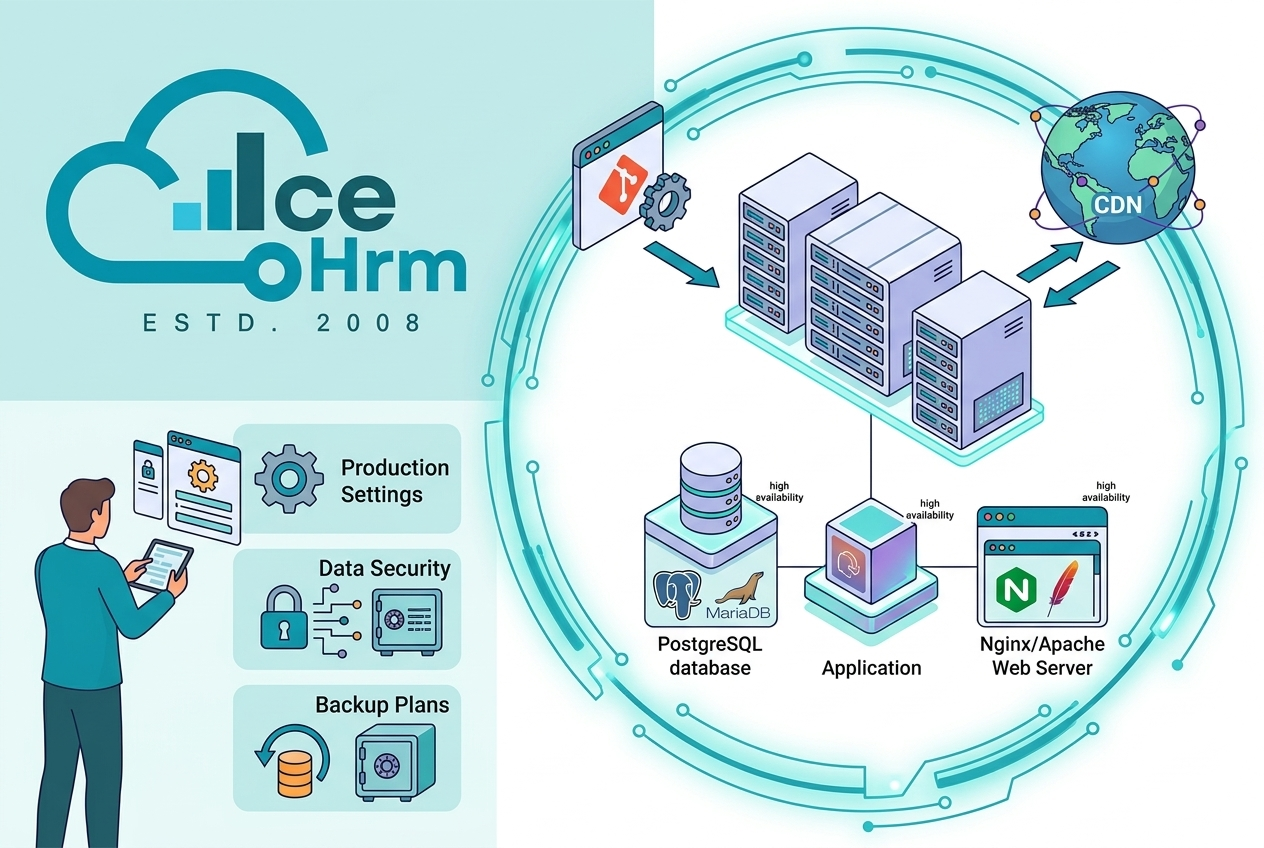
IceHrm thrives on a standard LAMP or LEMP stack. However, in a production environment, the database configuration is where deployments either succeed or fail under heavy usage.
"A database is only as good as its last successful backup and its current index optimization. In a production enterprise HRMS environment, query latency translates directly into employee frustration."
When setting up your database architecture for our commercial on-premise HR software platform, avoid using default out-of-the-box configurations:
root user. Create a isolated database user with permissions strictly limited to the specific IceHrm database schema.innodb_buffer_pool_size. This stores your active employee records directly in the system memory for lightning-fast lookups.Once your environment is provisioned, deploying the source code (whether using our open-source version or upgrading to the full-featured commercial HR software license) must follow a secure, locked-down pipeline.
A common security lapse in self-hosted deployments is leaving web directory permissions too loose. In a production environment, enforce the following rule:
755.644.app/storage and public/uploads directories must be writable by the web server user (e.g., www-data), but execution permissions must be strictly disabled within them.Your application .env file contains the keys to your entire HR infrastructure. Protect it diligently:
APP_DEBUG is explicitly set to false. Leaving debug mode enabled in production can accidentally expose sensitive database credentials to end-users if an application error occurs.APP_KEY for background encryption. This key handles the encryption of employee session data and sensitive fields. Keep this key safely backed up; losing it will cause permanent data loss for encrypted records.Because an HRIS houses sensitive employee data, payroll details, and identifying documentation, it is a high-value target for malicious actors. Security hardening is a foundational requirement for any corporate deployment.
Running an enterprise HRMS over an unencrypted HTTP connection is a critical vulnerability. Enforce an industry-standard SSL certificate:
Your server should minimize its exposure to the public internet. Block all external traffic except for ports 80 (automatically redirected) and 443 (HTTPS).
ufw or iptables to drop incoming traffic on all other ports.22 to a non-standard alternate port.Always disable server tokens in your configuration files. You should never broadcast the exact version of Nginx, Apache, or PHP running on your server, as this information allows automated bots to identify and target version-specific vulnerabilities.
If your server encounters a catastrophic hardware failure tomorrow, how quickly can your company recover? For HR departments, a data loss spanning even 24 hours can disrupt an entire payroll cycle or wipe out critical legal compliance documentation.
"There are two types of IT managers: those who back up their data regularly, and those who haven't lost an entire system yet."
mysqldump. Store these encrypted backups off-site in an isolated, secure location like an AWS S3 bucket or a separate secure vault.rsync to back up your application's uploads folder on a daily schedule. This directory stores all uploaded employee contracts, identification assets, and official documentation.As your organization grows from 100 to over 500 employees, single-server setups can experience performance degradation during peak usage hours—such as the first morning of a month when your entire workforce logs in simultaneously to download their payslips.
For larger corporate deployments, decouple your architecture by separating the application web server from the database server. This allows you to scale your database hardware resources independently while adding a protective layer of security, keeping your core data on an isolated server with zero direct exposure to the public internet.
While self-hosting offers ultimate structural freedom, your internal IT resources shouldn't have to carry the deployment burden alone. If your engineering team is balanced across multiple corporate priorities, leveraging our specialized HRMS enterprise deployment services is a highly strategic investment.
Our expert enterprise consulting teams regularly assist companies with:
Before opening your new installation to your broader company, confirm that every item on this checklist is fully addressed:
APP_DEBUG=false is live inside your active .env file.Deploying IceHrm within your own private infrastructure represents the ultimate step toward total organizational Data Sovereignty. By following this secure deployment blueprint, you ensure that your employee records are not merely organized, but actively defended by the exact same infrastructure standards deployed by global enterprises. You completely bypass the restrictive per-user scaling taxes common in SaaS models, creating a private, high-performance workspace built to scale seamlessly alongside your workforce.